Turn On and Use On-Screen Keyboard An On-Screen Keyboard in Windows:
On the Start menu:
• Point to All Programs.
• Point to Accessories.
• Point to Accessibility.
• Select On-Screen Keyboard.
Note A message box with a link to more information about the On-Screen Keyboard may appear. To close the box, select OK. 
• Move to All Programs by pressing P.
• If it does not open automatically, press ENTER to open the All Programs menu.
• Move to Accessories by pressing the DOWN ARROW key.
• Press ENTER.
• Select Accessibility by pressing ENTER.
• Move to On-Screen Keyboard by pressing the DOWN ARROW key.
• Press ENTER.
Note A message box with a link to more information about accessibility utilities may appear. To close the box, press ALT+TAB to select the message box, and then press ENTER. Then, press ALT+TAB to select the document in which you want to begin working. 
In case your keyboard or some keys stop working, Microsoft provides you with an alternative way to type-in using the mouse. To work this tool.
* Go to: 'Start menu'
* Select: 'Run'
* Type in: 'OSK'
* Press: 'OK'
A keyboard will be displayed on your monitor which you can use with your mouse. TRY IT YOURSELF
Thursday, January 11, 2007
USEFUL STUFF : On-Screen Keyboard

Sunday, January 07, 2007
LEARN : How to Tie a Tie Knot
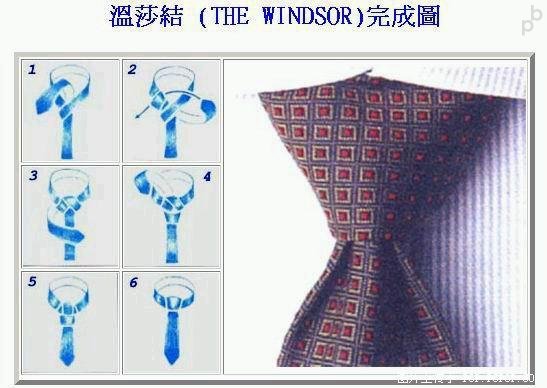
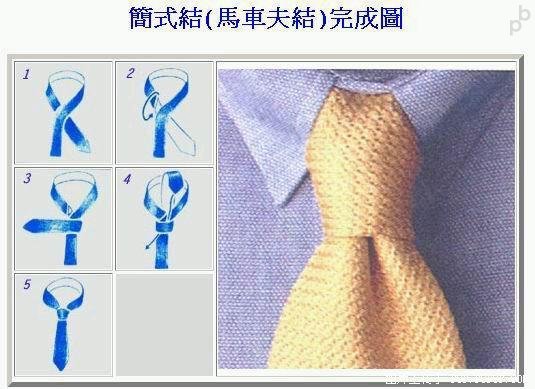

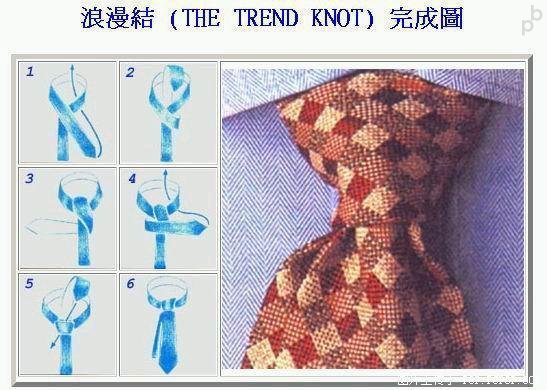
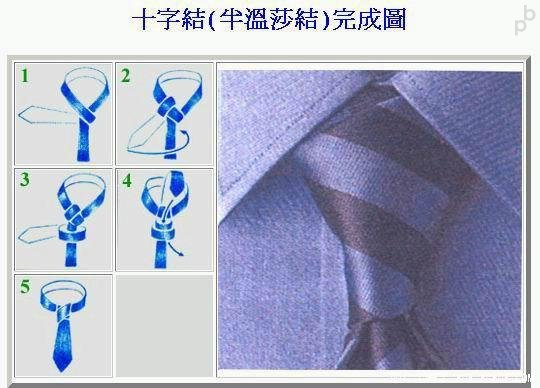
Wednesday, December 20, 2006
HEALTH TIME : Weight Loss Food


Garlic oil or the juice of garlic has a significant protective quality to cells which help to reduce fatty deposits. When taken, it brings down the levels of fat. Garlic, garlic oil, or anything with garlic, also has an antibiotic property to it and can be used to cure many ailments.

Sunday, October 01, 2006
TIPS: Recover Scratched CDs

Don't you feel like crying every time you add another disc to
your pile of scratched discs. Trashing that disc which contained
your favorite songs, pics, files, games or videos is not easy.
Read-on, if you find yourself wishing for a miracle every time
your fav CD is scratched:
Here's an easy home remedy, which might give you
the desired results. Rub a small amount of toothpaste on the scratch
and polish the CD with a soft cloth and any petroleum-based
polishing solution (like clear shoe polish). Squirt a drop of
Brasso and wipe it with a clean cloth.
Technology to the rescue:
There are many softwares available on the
net, which enable the recovery of the CD data. BadCopy Pro is one
such software, which can be used to recover destroyed data and
files from a range of media.
Just a few clicks is all it requires to recover the disc from almost all
kind of damage situation; be it corrupted, lost data, unreadable
or defective.


* Always wipe the CD from the center outward with straight spoke-like
strokes. Wiping CDs in circles will create more scratches.
* Do not scratch the graphics layer as you cannot repair the disc.
HINT: Hold the disc up to a light with the graphics layer facing
the light source. If you can see light thru the scratches at any
point then the disc may be irreparable and or exhibit loading
or playing errors.
* Clean your Disc players lens regularly with a suitable product to
ensure optimal viewing pleasure.
* Make sure to use a soft, lint-free cloth to clean both sides of the
disc. Wipe in a straight line from the centre of the disc to the
outer edge.
* If wiping with a cloth does not remove a fingerprint or smudge,
use a specialized DVD disc polishing spray to clean the disc.
* Only handle the disc by its outer edge and the empty hole in the
middle. This will help prevent fingerprints, smudges or scratches.
*Finger marks/ prints cause 43% of disc problems.
* General wear & tear causes 25% of disc problems.
* Player-related issues cause 15% of disc problems.
* User-related issues cause 12% of disc problems.
* PlayStation 2 machine scratches cause 3% of disc problems.
* Laser rot (a manufacturer error) causes 2% of disc problems.
Thursday, August 10, 2006
USEFUL THINGS: 7 Don't Act After Meal
1. Don't Smoke- Experiment from experts proves that smoking
a cigarette after meal is comparable to smoking 10 cigarettes
(chances of cancer is higher).
2. Don't Eat Fruits Immediately - Immediately eating
fruits after meals will cause stomach to be bloated with air.
Therefore take fruit 1-2 hr after meal or 1hr before meal.
3. Don't Drink Tea - Because tea leaves contain a high content of acid.
This substance will cause the Protein content in the food we consume to
be hardened thus difficult to digest.
4. Don't Losen Your Belt - Loosening the belt after a meal
will easily cause the intestine to be twisted & blocked.
5. Don't Bathe - Bathing will cause the increase of blood flow to
the hands, legs & body thus the amount of blood around the
stomach will therefore decrease. This will weaken the digestive
system in our stomach.
6. Don't Walk About - People always say that after a meal walk
a hundred steps and you will live till 99. In actual fact this is not
true. Walking will cause the digestive system to be unable to absorb
the nutrition from the food we intake.
7. Don't Sleep Immediately - The food we intake will not be able
to digest properly. Thus will lead to gastric & infection in our intestine.